
Local SEO for Service Businesses in the US and UK
A practical local SEO guide for service businesses in the US and UK covering Google Business Profile, storefront vs service-area set-up, NAP consistency, citations, compliant review generation, location pages and measurement.
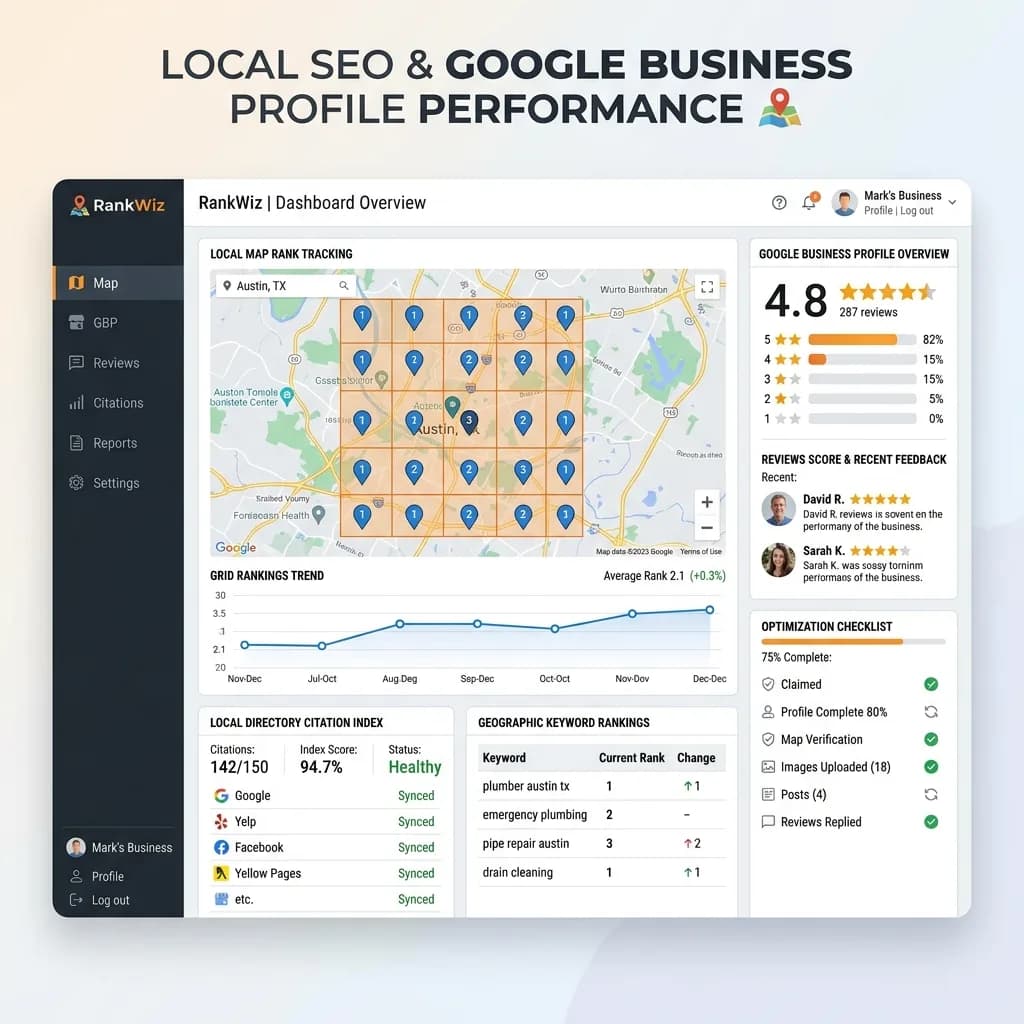
Local SEO for a service business is not just about ranking for "near me" searches. It is about showing customers and search engines that the business is real, relevant, trusted and available in the right area when someone needs help. For plumbers, electricians, cleaners, clinics, law and accounting firms, agencies, contractors and consultants, that visibility turns into calls, quote requests, bookings and direction requests.
The work is practical: accurate business information, a Google Business Profile that follows the rules, consistent listings on the directories customers use, honest reviews, useful service and location pages, a fast mobile site, and measurement that ties it all to leads. This guide covers that system for businesses in the United States and United Kingdom. The principles apply elsewhere, but the directories and review laws named here are US and UK specific.
If your business has several branches, pair this guide with the multi-location landing pages guide. For a closer walkthrough of profile management, see the Google Business Profile guide for service companies.
How Local Search Results Work
Google says its local results are based mainly on three factors, described in its guide to improving local ranking:
- Relevance: how well a Business Profile matches what someone is searching for. Complete, accurate information helps Google understand what you do.
- Distance: how far the business is from the searcher, or from the location mentioned in the search.
- Prominence: how well known the business is, drawing on information such as links, articles, directory listings, and review count and ratings.
You cannot change distance, and you cannot pay for better local rankings on Google. What you can control is relevance (what you tell Google and customers about your services and area) and prominence (the reputation and references you earn over time). Your website supports both: the profile links to it, and Google uses it to understand your services.
Local results appear in two main places: the map pack and local finder, driven largely by Business Profiles, and the ordinary organic results, driven by your website. A good local strategy works on both.
Google Business Profile: Set Up to the Guidelines
Your Business Profile is often the first thing a local customer sees. Google's guidelines for representing your business are strict, and breaking them can lead to suspension.
Eligibility and name
- A business is eligible if it has a physical location customers can visit, or it travels to customers where they are. Online-only businesses are not eligible.
- Virtual offices and mailbox addresses are not eligible. If you rent an address but do not operate there, it cannot be your listing address.
- Use your real-world business name, exactly as it appears on signage, your website and stationery. Do not add keywords, locations, taglines or promotional text to the name. Stuffing "Best Emergency Plumber London" into the name field is a common reason for suspensions and for competitors reporting you.
Complete every relevant field
- Primary category: the single category that best describes the core business. Choose it carefully; it has a strong effect on which searches you appear for. Add secondary categories only where they genuinely apply.
- Services: list the services you actually provide, with short, plain descriptions.
- Hours: regular hours, holiday hours and any special hours, kept up to date.
- Phone and website: a local or main number that is answered, and a link to the most relevant page (the homepage for a single location, or the location page for a branch).
- Description: what you do, who you serve and where, in plain language, without links or promotional claims.
- Photos: real photos of your team, vehicles, premises and completed work. Stock images do little.
- Attributes, booking links and messaging where relevant and where you can respond promptly.
Keep it active
Respond to reviews, answer questions, post updates when you have real news or offers, and check the profile regularly for edits suggested by users or Google. Anyone can suggest changes to a listing, so an unmonitored profile can drift out of date.
Storefront, Service-Area or Hybrid
How you set up the profile depends on how customers meet you.
| Business type | Example | Address on profile | Service area |
|---|---|---|---|
| Storefront | Dental practice, salon, retail repair shop | Shown | Optional |
| Service-area business | Plumber, mobile dog groomer, cleaning company working from home | Hidden | Required |
| Hybrid | Garden centre that also delivers, law firm that visits clients | Shown | Added |
Google's guidelines say service-area businesses without a storefront should hide their address; a plumber working from a home address, for example, should clear the address from the profile. Service areas should reflect where you actually serve, set by city, postcode or region. Listing a huge area does not make you rank everywhere; distance from the searcher still matters.
A service-area business must still be staffed and reachable during its stated hours, and the address used for verification must be real. If you have genuine staffed offices in several towns, each can have its own profile. If you do not, adding extra profiles at addresses you do not operate from breaks the rules.
NAP Consistency and Citations in the US and UK
NAP stands for name, address and phone number. Consistent NAP across the web helps customers and search engines trust that the listings refer to the same business.
Build a single source of truth
Decide the canonical version of your business name, address format, main phone number, website URL, hours and categories, and use it everywhere. Small differences such as "Street" versus "St" matter less than conflicting phone numbers, old addresses and duplicate listings, which confuse customers and split reviews.
Where to be listed
Start with the platforms that power maps, voice assistants and customer research, then add directories that are genuinely used in your industry and area.
Core platforms (US and UK):
- Google Business Profile
- Apple Business Connect, which manages how your business appears in Apple Maps and Siri
- Bing Places for Business, which feeds Bing and Microsoft services
- Facebook business page
Common US sources: Yelp (managed through Yelp for Business), the Better Business Bureau, Nextdoor, Angi and similar home-services marketplaces, your local chamber of commerce, and professional association directories for your field.
Common UK sources: Yell, Thomson Local, Checkatrade or TrustATrader for trades, Nextdoor, local council or business improvement district directories, chambers of commerce, and professional body directories (for example, the relevant regulator or trade association's "find a member" listing).
Quality beats quantity. A few accurate listings on platforms your customers actually use are worth more than hundreds of low-quality directory entries. Keep a spreadsheet of every listing, its login owner and the date last checked.
Clean up before you build
Search for your business name, old names, old addresses and phone numbers. Merge or remove duplicates through each platform's process, update outdated listings, and claim listings created automatically. If you move or change phone number, update the core platforms first, then work through the rest.
Reviews: How to Ask, and What the Law Prohibits
Reviews influence both rankings (as part of prominence) and whether a customer picks up the phone. They are also now regulated more strictly on both sides of the Atlantic.
What Google allows
Google's policies on fake engagement allow businesses to ask customers for genuine reviews, without incentives and without trying to influence the rating. They prohibit:
- Offering payment, discounts, free goods or services in exchange for a review, or for changing or removing a negative review
- Discouraging negative reviews or selectively asking only happy customers ("review gating")
- Reviews posted by the business, its staff or on its behalf from multiple accounts
United States: the FTC rule on consumer reviews
The FTC's Trade Regulation Rule on the Use of Consumer Reviews and Testimonials (16 CFR Part 465) took effect on 21 October 2024. According to the FTC's announcement, it prohibits, among other things:
- Creating, buying or selling fake reviews, including reviews from people who do not exist or had no real experience with the business
- Offering compensation or incentives conditioned on a review expressing a particular sentiment
- Undisclosed reviews by company insiders, such as officers and managers
- Company-controlled websites posing as independent review sites
- Suppressing negative reviews through unfounded threats or intimidation
- Buying or selling fake social media indicators such as followers or views
The rule allows the FTC to seek civil penalties against knowing violators. The FTC's questions and answers on the rule are worth reading if you run review campaigns or use testimonials on your site.
United Kingdom: the DMCC Act
In the UK, the Digital Markets, Competition and Consumers Act 2024 banned fake reviews from 6 April 2025, including commissioning fake reviews and concealing that a review was incentivised. The CMA's fake reviews guidance (CMA208) explains the obligations for businesses and for sites that publish reviews, and the CMA can now impose significant penalties directly.
This is general information, not legal advice. If you run incentive programmes, affiliate schemes or publish reviews on your own site, have the process checked.
A compliant review process
- 1Ask every customer, or a consistent, non-selective group, shortly after the job is done.
- 2Send a direct link to your Google review form, and optionally to one other platform that matters in your industry.
- 3Do not offer anything in return for the review, and do not ask for a specific rating.
- 4Never write reviews yourself or ask staff, friends or family to post them.
- 5Reply to reviews, especially negative ones, calmly and without revealing private customer information. Regulated professions such as healthcare and legal services have extra confidentiality duties.
- 6Report reviews that genuinely break platform policy through the platform, rather than pressuring the reviewer.
- 7If you show testimonials on your website, use real ones with permission and disclose any connection with the reviewer.
Location and Service Pages Without Doorway Spam
Your website does the heavy lifting in organic results and gives Google the detail behind your profile.
Service pages
Create one strong page per core service. Each should explain what the service includes, who it is for, the areas you cover, how pricing works (even if you cannot publish prices), what the process looks like, credentials and guarantees, real photos and project examples, FAQs, and a clear way to call or request a quote. A thin page that only repeats the service name will not compete.
Location pages
Location pages are useful when you have a genuine presence or meaningful work in an area. They become a problem when they are near-duplicates created only to rank for city names. Google's spam policies define doorway abuse as pages created to rank for specific, similar queries that lead users to less useful intermediate pages, and they list "multiple domain names or pages targeted at specific regions or cities that funnel users to one page" as an example.
A location page earns its place when it contains information unique to that area, such as:
- The team or office that serves it, with a real address if you have one there
- Projects completed locally, with photos and details
- Local considerations (building types, regulations, permits, parking or access)
- Testimonials from customers in that area
- Specific service availability, response times or coverage boundaries
If you cannot write something genuinely different for a town, cover it on a broader regional page rather than creating a thin page. Link location pages from a clear hierarchy (for example, an "Areas we serve" hub) so they are part of the site's navigation, not orphaned pages built for search engines.
Local Technical SEO
- Mobile first. Most local searches happen on phones. Tap-to-call buttons, fast pages, readable text and short forms matter more than decoration. The WordPress Core Web Vitals checklist covers speed fixes.
- Structured data. Add LocalBusiness structured data with your name, address (if shown publicly), phone, hours and URL, matching your profile exactly. Use the most specific subtype that applies. Validate it and fix errors; see fixing schema markup errors in Search Console.
- Consistent contact details. Put NAP in the footer or on a contact page as text, not only in an image.
- Embedded map on the contact or location page where helpful.
- Search Console. Verify the site, submit a sitemap and monitor indexing and queries; the Search Console setup guide walks through it.
- Clean internal links between services, locations and relevant articles.
Measuring Calls, Forms and Bookings
Rankings are only a proxy. Track the actions that bring revenue.
- Business Profile performance: calls, website clicks, direction requests and messages from the profile's performance reports.
- UTM tags on the profile's website link, so analytics can separate profile traffic from other organic visits.
- Call tracking where useful. If you use tracking numbers, keep your main number as the primary number on the profile and listings so NAP stays consistent.
- Form and booking events in analytics, set up as key events, with the service and location recorded where possible.
- Lead quality: a simple CRM field showing how each customer found you, so you can see which services and areas produce paying work. The lead management automation guide shows how to connect forms to follow-up.
Measurement must respect privacy rules. UK visitors must consent before non-essential analytics and advertising cookies run under PECR, with "Reject" as easy as "Accept", and Google requires Consent Mode v2 signals for ad measurement of UK and EEA users. Contact form data needs a lawful basis under the UK GDPR, a privacy notice and data processing agreements with your tools. In the US, consider California's CCPA/CPRA if you have customers there, and follow CAN-SPAM for marketing email.
Review the numbers monthly: which services and areas generate enquiries, which pages convert, and which reviews and questions reveal gaps in your content. For a technical baseline, run a technical SEO audit. If you want help setting up the system, get in touch.
Frequently Asked Questions
Can I rank in a town where I do not have an office?
In organic results, yes, if you have a genuinely useful page about serving that area. In the map pack, distance from the searcher matters, so ranking far from your verified location is harder. Do not create profiles at addresses where you do not operate.
Should a home-based business show its address?
If customers do not visit you, Google's guidelines say to hide the address and set a service area instead.
Can I add keywords or my city to my business name on Google?
No. The name should match your real-world business name. Adding keywords violates Google's guidelines and can lead to suspension.
Can I offer a discount for a review?
No. Google prohibits incentives for reviews, the FTC rule bans incentives conditioned on positive or negative sentiment, and UK law requires incentivised reviews to be disclosed. The simplest compliant approach is to ask all customers for honest feedback, with nothing in return.
How many directories should I be listed in?
Enough to cover the core platforms (Google, Apple, Bing, Facebook) and the handful of directories your customers actually use in your country and industry. Accuracy matters far more than volume.
How long does local SEO take?
Profile and listing fixes can show effects relatively quickly, while reviews, content and reputation build over months. Measure leads and enquiries, not just rankings, and keep improving the system every month.
Related posts

Google Consent Mode v2 and Cookie Consent: A Setup Guide for Business Sites
How to set up Google Consent Mode v2 alongside a compliant cookie banner: ePrivacy and PECR consent rules, the GDPR consent standard, the four consent parameters, basic versus advanced mode, CMP requirements, WordPress and Shopify implementation, Tag Assistant testing and common mistakes.
Read article →
US State Privacy Laws for Small Business Websites: What Applies and What to Do
A practical 2026 guide to US state privacy laws for small business websites: CCPA/CPRA thresholds, the other comprehensive state laws, Texas and Nebraska small-business rules, privacy notices, opt-out of sale and sharing, Global Privacy Control, pixels, forms, vendor contracts and CAN-SPAM.
Read article →

Magento Migration Guide: Moving to Shopify or WooCommerce
A practical guide for Magento Open Source and Adobe Commerce merchants: support lifecycle triggers, Shopify vs WooCommerce vs staying, data inventory, redirect mapping at scale, and a cutover checklist.
Read article →
Author
Anushka Dahanayake
Anushka Dahanayake builds SEO-focused websites, e-commerce platforms, dashboards, and automation systems for businesses worldwide.