
eBay Listing SEO and Best Match: A Practical 2026 Guide
A practical eBay listing SEO guide covering Best Match, 80-character titles, item specifics, product identifiers, photos, pricing, shipping, and seller performance.
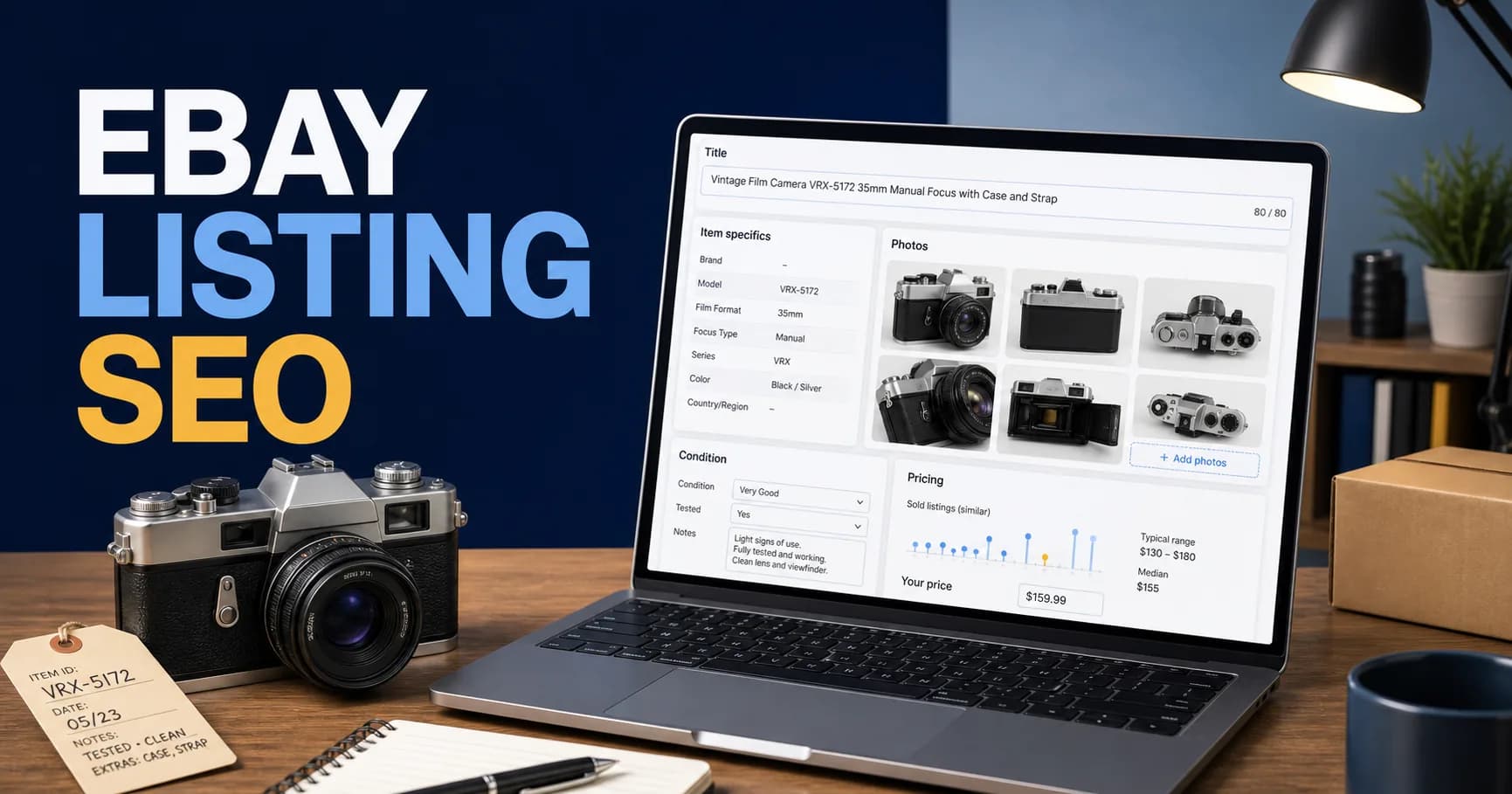
eBay listing SEO is the process of helping the marketplace understand an item, match it with relevant buyer searches, and present it competitively in search results. It includes keywords, but it also depends on structured product data, listing completeness, price, shipping and return terms, seller history, photographs, and the accuracy of the offer.
Many third-party articles still describe eBay search primarily as “Cassini.” That name has historical relevance, but eBay's current seller documentation explains search through Best Match, the default order used when buyers view results. This guide therefore focuses on the factors eBay currently documents instead of claiming knowledge of an unpublished algorithm.
According to eBay, Best Match considers how closely a listing matches the search, item popularity, price, listing quality and completeness, selling terms, and the seller's track record. No title formula can compensate for an inaccurate product, missing item specifics, uncompetitive total cost, or unreliable fulfillment.
Key Takeaways
- Optimize for eBay's documented Best Match system, not a supposed secret Cassini formula.
- Use a clear, accurate title with relevant buyer language and no more than 80 characters.
- Select the correct category and complete Required, Required Soon, and relevant Recommended item specifics.
- Add the exact UPC, ISBN, EAN, MPN, or catalog match when one genuinely applies.
- Describe condition precisely and photograph the actual item's flaws.
- Compare sold listings and total buyer cost before setting the price.
- Treat shipping, handling time, returns, inventory accuracy, and seller service as search inputs.
- Measure impressions, click-through, watchers, conversion, returns, and margin at listing level.
How eBay Best Match Works
When a buyer searches on eBay, Best Match is the default sorting method. eBay says it is designed to show the listings that are most relevant to the buyer and most useful when making a purchase decision.
The platform's current Best Match documentation identifies several factor groups:
| Factor | What the seller controls |
|---|---|
| Search relevance | Accurate title, category, item specifics, identifiers, description |
| Item popularity | Product demand and how buyers interact with the offer |
| Price | Competitive item price and total delivered cost |
| Listing quality | Complete information, clear description, useful photographs |
| Selling terms | Handling time, shipping cost, returns and other buyer-facing terms |
| Seller history | Accurate fulfillment, service quality, tracking and avoided cancellations |
eBay does not publish the weight of each factor for every query or category. The practical strategy is to create the most complete, accurate, and competitive offer possible for the intended buyer.
Start With the Exact Item Identity
Before researching keywords, identify the product precisely. Record:
- Brand or manufacturer
- Product type
- Model, series or part number
- Size, capacity, color or configuration
- Material
- Condition
- Included components
- Compatibility
- Production year or era when defensible
- Product identifiers
- Defects, repairs, modifications or missing parts
This information becomes the foundation for the category, title, item specifics, catalog match, condition and description. Guessing any of it can create irrelevant impressions, returns, policy issues, and negative buyer experiences.
For a vintage camera, the item identity might be: fictional VRX-5172 manual-focus 35 mm film camera, black and silver, tested, supplied with a case and strap, with cosmetic wear near the base plate. That is much more useful than “old retro camera rare collectible.”
Choose the Correct eBay Category
The category affects which item specifics are available, how buyers browse, and which filters can surface the listing. Choose the most relevant product category rather than a broad category that appears to receive more traffic.
eBay may suggest a category based on the title or catalog match. Treat that as assistance rather than proof. Confirm that the suggested category describes the exact item and selling format.
If eBay permits a second category, evaluate whether the additional visibility justifies the fee and whether both categories are genuinely relevant. Do not use a second category merely to place an item in front of an unrelated audience.
Write an Effective 80-Character eBay Title
eBay allows a maximum title length of 80 characters and recommends using the available space for relevant information. The title should summarize the item using language a qualified buyer is likely to search.
A useful title order is:
Brand + product/model + defining specification + size/color + condition or included feature
| Product | Example title |
|---|---|
| Camera | VRX-5172 35mm Manual Focus Film Camera Black Silver Tested with Case |
| Jacket | Women's Brown Leather Motorcycle Jacket Size Medium Quilted Lining |
| Replacement part | A42-1108 Refrigerator Door Shelf Bin Clear Replacement Part 38 cm |
| Book | The Example Handbook First Edition 1987 Hardcover ISBN 0000000000 |
Use the fields that distinguish the product. A model number or part number can be more useful than a broad adjective. For fashion, brand, product type, gender or department, color, material, style and size may matter. For electronics, model, storage, connectivity, lock status and condition can matter.
Avoid:
- Unrelated trending keywords
- Repeating the same noun several times
- “WOW,” “LOOK,” “L@@K,” or other attention devices
- Unsupported words such as rare, authentic, mint, genuine or vintage
- Excessive punctuation and symbols
- Competitor brand names that do not describe the item
- Information that conflicts with item specifics or condition
Correct spelling matters. Do not intentionally misspell a brand to target typo searches. eBay's listing-title documentation confirms the 80-character maximum.
Complete Item Specifics Before Adding More Keywords
Item specifics are structured attributes such as brand, size, type, color, style, material, model and compatibility. Buyers use them to filter results, especially on mobile. A listing can disappear from a filtered result if the corresponding specific is missing.
eBay labels specifics as:
- Required: must be completed for applicable new or revised listings
- Required Soon: scheduled to become mandatory
- Recommended: based on buyer demand and popular searches
- Additional: extra details that can improve understanding
Complete every Required field accurately, review Required Soon fields before enforcement, and add every relevant Recommended field. Never insert a keyword into the wrong field or choose an inaccurate option just to fill the completeness meter.
Use eBay's supplied values when they accurately represent the item. Standard values make filtering and comparison easier. Custom values may be necessary for genuinely unusual items, but they should not replace a suitable platform value.
eBay's Item Specifics guide states that item specifics and product identifiers are important ways to help buyers find products and that completing more relevant specifics improves matching.
Use Exact Product Identifiers and Catalog Matches
Product identifiers can include:
- UPC
- EAN
- ISBN
- MPN
- Compatible catalog or product record
Use the identifier printed for the exact product and variation. Do not borrow an identifier from a similar model or select a catalog record that differs in year, capacity, color, region, bundle, generation or compatibility.
An accurate catalog match can supply standardized information and help eBay understand the product. An incorrect match can mislead buyers and increase returns. eBay's listing best practices specifically recommends correct product identifiers and warns against selecting a similar but inaccurate catalog version.
When an item legitimately has no manufacturer identifier, use only the value permitted by the category and eBay policy. Do not use “N/A,” “Does not apply,” generic, or unbranded when the manufacturer has supplied an identifier. The item-description policy requires accurate product data.
Describe Condition With Precision
Condition is both a structured field and a buyer-trust commitment. Select the supported condition that most accurately describes the item, then use the condition description to explain details a label cannot capture.
For a used item, cover:
- Testing performed
- Functions confirmed working
- Functions not tested
- Cosmetic marks
- Repairs or modifications
- Missing components
- Battery health when known
- Odor, smoke or storage exposure when relevant
- Original versus replacement parts
- What is included in the shipment
Avoid “excellent for age” without specific evidence. A buyer cannot evaluate that phrase consistently. “Two 8 mm scratches on the base plate; view photos 7 and 8” is more useful.
Condition must remain consistent across the title, item specifics, photographs and description. Do not select “new” while describing opened packaging or visible use elsewhere.
Use Photographs to Confirm the Offer
eBay says the first photograph appears in search results and recommends centering the item and filling the frame. The platform currently allows sellers to add up to 24 images to a listing for free, subject to category and site rules.
Use the image sequence deliberately:
- 1Clear complete-item view
- 2Opposite side
- 3Front and rear details
- 4Model, size, serial or identifier label where safe
- 5Included accessories
- 6Scale or measurement
- 7Every material flaw
- 8Packaging or case when included
- 9Operational display or test result when visually meaningful
Photograph the actual used, vintage or unique item. eBay advises against using a stock image as the main picture when an item is not brand new. Do not hide scratches, stains, chips, repairs, discoloration or missing components.
Avoid borders and promotional text on product photographs. Keep the background clean, colors accurate and lighting consistent. The purpose is not only visual appeal; it is to reduce uncertainty and returns. Review eBay's official photo guidance before creating a standardized workflow.
Write a Description for Decisions, Not Keyword Density
The description should help a buyer verify that the item meets their needs. It must remain accurate and directly related to the item or selling terms.
A reusable description structure is:
Item summary
State the exact product, model, variation and principal use in one or two sentences.
Condition and testing
Explain functional tests, cosmetic wear, repairs, missing features and anything not tested.
Specifications
List dimensions, material, capacity, compatibility, region, power requirements or other decision-critical information.
Included items
State exactly what arrives. If an accessory visible in a lifestyle photograph is not included, say so clearly or remove it from the image.
Fulfillment and returns
Explain handling, packaging, shipping limitations and return terms without contradicting the structured policy fields.
Do not paste a manufacturer description that implies accessories or warranties you do not supply. Remove obsolete HTML, scripts, remote images and visually complex templates that perform poorly on mobile.
Price Using Sold Evidence and Total Buyer Cost
Active listing prices show seller expectations; sold records provide stronger evidence of transactions. Use eBay Product Research or available sold/completed listing data to compare genuinely similar items.
Match important variables:
- Exact model or compatible part
- Condition
- Size or configuration
- Included accessories
- Location and shipping market
- Selling format
- Seller reputation
- Season and transaction date
Calculate the total buyer cost, not only the item price. A listing at $80 plus $25 shipping competes with an equivalent $99 listing that includes shipping.
Also calculate the seller's net:
Sale price + charged shipping − marketplace fees − promoted listing fees − payment/transaction costs − postage − packaging − product cost − expected return cost
Ranking for an offer that loses money is not success. Set a minimum acceptable margin before testing discounts, offers or promoted listings.
Choose Auction or Fixed Price Intentionally
eBay recommends auction-style listings for unique or difficult-to-value items when competitive bidding may establish the price. Fixed price is usually more suitable when the seller knows the price, has multiple quantities or variations, or wants longer availability.
Use an auction because the product and demand justify it—not because the listing has failed at a fixed price. A low starting bid can produce a low sale if there are too few qualified bidders.
For repeatable inventory, fixed-price listings make it easier to accumulate sales history, manage quantity and test offer changes. For scarce collectibles, research transaction frequency before choosing an auction duration and ending time.
Shipping, Handling and Returns Affect Competitiveness
Best Match considers listing terms such as return policy and handling time. Buyers also evaluate total cost and delivery expectations before clicking or purchasing.
Use a handling time you can meet consistently. A one-day promise that causes late shipment is worse than an accurate two-day commitment. Weigh and measure packed products before publishing rates. For fragile or valuable items, document packaging, insurance and tracking procedures.
Review:
- Handling time
- Shipping service
- Calculated versus flat shipping
- Free-shipping economics
- Combined shipping
- International exclusions and customs clarity
- Return period
- Who pays return postage
- Restocking or deduction rules permitted by policy
Do not hide shipping costs or restrictions in the description while structured fields say something different.
Seller Performance and Inventory Accuracy
eBay includes the seller's track record in Best Match. Reliable operations protect search visibility and profitability.
Important practices include:
- Dispatching within the stated handling time
- Uploading tracking when available
- Responding accurately to buyer questions
- Describing products and flaws honestly
- Avoiding out-of-stock cancellations
- Resolving problems professionally
- Maintaining accurate inventory across channels
Cross-listing the same unique item on eBay, Etsy, Depop and another store creates cancellation risk if inventory does not synchronize quickly. Use a centralized SKU and delist sold products across every channel.
For a broader workflow, see our vintage reselling SEO guide, Etsy listing SEO guide, and Depop selling guide.
Promoted Listings Versus Organic Best Match
Promoted Listings can buy additional placement, but advertising does not remove the need for an accurate and competitive listing. Separate organic and paid reporting so you know whether sales came from improved relevance, stronger conversion or increased advertising exposure.
Before increasing promotion:
- Confirm the item is eligible and accurately described
- Check impression and click data
- Improve weak photographs and titles
- Complete item specifics
- Confirm price and delivery competitiveness
- Calculate margin after advertising fees
- Set a test period and success threshold
Advertising a listing with poor conversion can amplify cost rather than solve the offer.
A 30-Day eBay Listing Optimization Workflow
Days 1–3: Baseline
Select ten commercially important listings. Record impressions, page views, click-through rate where available, watchers, quantity sold, conversion, returns, price, shipping, handling time and net margin.
Days 4–7: Identity and structured data
Confirm category, catalog record, identifier, variation, condition and Required item specifics. Complete accurate Recommended specifics. Fix conflicting information before rewriting titles.
Days 8–14: Search presentation
Rewrite titles using up to 80 relevant characters. Replace weak first photographs and add images for defects, labels, dimensions and included parts. Improve the description opening and condition detail.
Days 15–21: Commercial offer
Compare sold records, total delivered cost, handling time and returns. Adjust only when the evidence supports a change and the resulting sale remains profitable.
Days 22–30: Observe and classify
Allow enough impressions for useful comparison. Classify each listing:
| Pattern | Likely investigation |
|---|---|
| Few impressions | Category, title, specifics, identifier, demand or eligibility |
| Impressions but few views | Main image, title clarity, price or irrelevant matching |
| Views/watchers but no sale | Price, shipping, trust, condition or delayed buyer intent |
| Sales with returns | Accuracy, condition, compatibility, photos or fulfillment |
| Sales with weak margin | Pricing, fees, advertising, postage or product cost |
Common eBay Listing SEO Mistakes
- Treating “Cassini” as a known formula rather than using current Best Match guidance
- Filling titles with repeated or unrelated keywords
- Leaving Recommended item specifics blank when they apply
- Using a similar but incorrect catalog match
- Entering “N/A” when a real product identifier exists
- Hiding condition problems in vague language
- Using stock photos for a unique used item
- Omitting measurements or compatibility information
- Pricing from active listings without checking sold evidence
- Ignoring shipping cost when comparing offers
- Promising handling speed the operation cannot maintain
- Cross-listing unique inventory without synchronization
- Measuring gross revenue without fees, returns and margin
- Changing every field simultaneously and losing the ability to diagnose results
eBay Listing SEO Checklist
- The item complies with current eBay policy.
- Product identity and condition are verified.
- The most relevant category is selected.
- The catalog match is exact or omitted.
- Product identifiers are accurate.
- All Required item specifics are complete.
- Relevant Required Soon and Recommended specifics are complete.
- The title is accurate, readable and no longer than 80 characters.
- The title uses only terms that describe the item.
- The first photograph clearly shows the actual item.
- Images cover every side, identifier, accessory and defect.
- Condition is consistent across every listing field.
- The description includes specifications, testing and included items.
- Price research uses genuinely comparable sold records.
- Total buyer cost remains competitive.
- Handling and shipping promises are achievable.
- Return terms are clear and consistent.
- Cross-channel inventory is synchronized.
- A performance baseline exists before changes.
- Success is measured using sales, returns and margin—not views alone.
Frequently Asked Questions
Is eBay search still called Cassini?
Cassini remains a commonly used historical name, but eBay's current seller documentation explains the default search order as Best Match. Sellers should follow current Best Match and listing-quality guidance instead of assuming third parties know a private algorithm.
How long can an eBay listing title be?
An eBay listing title can contain up to 80 characters. Use the space for accurate details such as brand, product, model, size, color, material or part number. Do not fill it with repeated or unrelated words.
Are item specifics more important than the description?
They serve different purposes. Item specifics help eBay match and filter structured attributes, while the description explains condition, testing, dimensions, included components and other buying details. A strong listing needs both.
Should I complete every Recommended item specific?
Complete every Recommended field that accurately applies. Do not enter misleading values merely to fill a meter. If eBay offers a way to dismiss an irrelevant recommendation, use it rather than inventing information.
Do Promoted Listings improve organic ranking?
Treat promoted placement and organic Best Match performance separately. Advertising can purchase visibility, but it does not correct an inaccurate category, missing specifics, weak photography, uncompetitive total cost or poor seller service.
How many photos can an eBay listing use?
eBay's current Best Match guidance says sellers can include up to 24 pictures for free. Availability can vary by category or site, so verify the active listing interface. Use images to show the product, identifiers, dimensions, included items and every flaw.
Should I use free shipping?
Only when it makes sense for the buyer and the business. Compare total delivered cost and calculate margin. “Free” shipping is still paid through the product price or seller margin and is not automatically the best choice for every item.
How quickly do listing changes affect sales?
There is no guaranteed timeline. Demand, competition, product condition, seasonality, price, seller history and traffic volume all matter. Establish a baseline, make focused changes, and wait for enough impressions and buyer activity to compare responsibly.
Final Recommendation
Begin with listings that already receive meaningful impressions or represent important inventory. Correct identity, category, product identifiers and item specifics first. Then improve the title, images, condition detail, description, total delivered cost and selling terms. Protect the gains with accurate fulfillment and synchronized inventory.
If you manage a larger catalog, our product upload management service can help apply bulk changes in a structured way.
Sources and Review Date
This guide was reviewed on 21 August 2026 using current eBay Seller Center, Help and Developer documentation. Marketplace requirements change, so verify category-specific fields and policies before revising a large catalog.
Related posts

Product Page SEO Services Guide for E-commerce Brands
A practical guide to product page SEO services for Shopify, WooCommerce and marketplace-connected stores.
Read article →

Magento Migration Guide: Moving to Shopify or WooCommerce
A practical guide for Magento Open Source and Adobe Commerce merchants: support lifecycle triggers, Shopify vs WooCommerce vs staying, data inventory, redirect mapping at scale, and a cutover checklist.
Read article →

Wix or Squarespace to WordPress: An SEO-Safe Migration Guide
When leaving Wix or Squarespace for WordPress is worth it, what each platform actually lets you export, how to rebuild and redirect every URL, and how to monitor the move in Search Console.
Read article →
Author
Anushka Dahanayake
Anushka Dahanayake builds SEO-focused websites, e-commerce platforms, dashboards, and automation systems for businesses worldwide.