
CRM Implementation for Small Businesses: Requirements and Roadmap
A practical CRM implementation roadmap for small businesses covering requirements, contacts, deals, pipelines, data cleanup, automation, adoption and reporting.
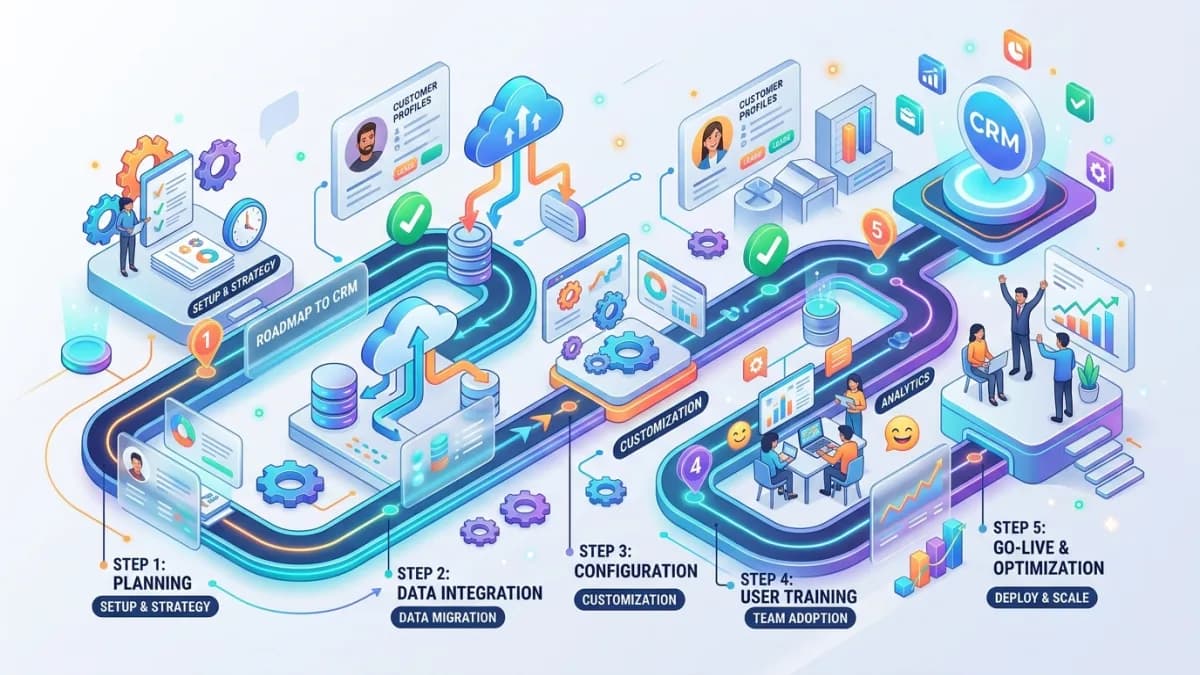
A CRM should make a small business easier to run. It should help the team understand leads, customers, conversations, opportunities, follow-ups, revenue, service history and next actions. It should reduce scattered spreadsheets, forgotten messages and sales notes trapped in someone's head.
But many CRM projects fail quietly.
The business signs up for a tool, imports messy contacts, creates too many fields, builds a pipeline nobody uses, automates reminders that annoy staff, and then slowly returns to WhatsApp, email and spreadsheets. The CRM still exists, but it is no longer the source of truth. It becomes a digital attic.
CRM implementation is not mainly a software setup task. It is a business systems project.
This guide gives small businesses a practical roadmap for implementing a CRM properly: requirements, data model, pipeline stages, permissions, migration, automation, reporting, training and rollout. It is written for service businesses, agencies, consultants, local companies, B2B sellers, education providers and SMEs that want a CRM people actually use.
Use this with the Small-Business Automation Guide, Client Onboarding Automation Guide, Lead Management Automation Guide, Business Dashboard Design Guide, and Business Automation & Integrations.
Key Takeaways
- A CRM implementation should start with sales and service process design, not tool configuration.
- The CRM must have a clear source-of-truth role for contacts, companies, deals and customer history.
- Pipeline stages should represent real buying progress, not vague hope.
- Data migration should include cleanup, deduplication, field mapping and owner assignment.
- Automation should support follow-up and handoff, not hide poor sales discipline.
- Permissions, privacy and access control matter because CRMs hold sensitive customer information.
- CRM adoption depends on useful reports, simple fields, staff training and management behavior.
- Measure implementation success by usage, data quality, response time, pipeline accuracy and revenue visibility.
What CRM Implementation Means
CRM implementation is the process of turning customer relationship management into a working system.
It includes:
- choosing or configuring CRM software
- defining customer records
- designing pipeline stages
- importing contacts
- cleaning duplicate data
- assigning owners
- setting permissions
- connecting website forms
- automating follow-ups
- creating dashboards
- training staff
- measuring usage
The goal is not to have a CRM. The goal is to have reliable customer and revenue visibility.
A good CRM answers:
- Who are our leads?
- Where did they come from?
- Who owns follow-up?
- What stage are they in?
- What was promised?
- What is the next action?
- Which deals may close?
- Which customers need service?
- Which marketing channels create valuable opportunities?
- Where are we losing people?
If the CRM cannot answer these questions, implementation is incomplete.
Why Small CRM Projects Fail
CRM projects usually fail for practical reasons.
Common causes:
- no clear owner
- messy imported data
- too many fields
- unclear pipeline stages
- weak follow-up discipline
- staff see CRM as extra admin
- management does not use CRM reports
- duplicate records multiply
- automations fire at the wrong time
- CRM is not connected to website forms
- no rules for lost deals
- no permissions plan
- no training
- no cleanup schedule
The most dangerous failure is when people stop trusting the data. Once that happens, every report is questioned and every meeting becomes a debate.
CRM implementation should therefore focus on trust.
CRM Requirements Checklist
Before choosing or configuring a CRM, document requirements.
Business requirements
Ask:
- What type of business are we?
- Do we sell services, products, subscriptions or projects?
- How many leads do we receive monthly?
- How many people follow up?
- How long is the sales cycle?
- Do we need quotes or proposals?
- Do we need customer support history?
- Do we need client onboarding?
- Do we need recurring revenue tracking?
- Do we need team activity tracking?
Workflow requirements
Define:
- lead sources
- qualification criteria
- pipeline stages
- lost reasons
- next action rules
- handoff to delivery
- renewal workflow
- support workflow
- reporting cadence
Technical requirements
List:
- website form integration
- email integration
- calendar integration
- accounting integration
- proposal/contract integration
- marketing email integration
- dashboard/export needs
- API/webhook support
- user permissions
- mobile access
- backup/export capability
Keep requirements simple and specific. A vague requirement like better sales process does not help configuration.
Data Model: Contacts, Companies and Deals
The CRM data model decides whether records stay clean.
Common objects:
- contact
- company
- lead
- deal or opportunity
- activity
- task
- note
- proposal
- invoice reference
- project reference
- support ticket
Contact
A contact is a person.
Important fields:
- name
- phone
- role/title
- company
- lifecycle stage
- consent/source
- owner
Company
A company is an organization.
Important fields:
- company name
- industry
- website
- location
- account owner
- size
- customer status
Deal
A deal is a sales opportunity.
Important fields:
- service/product
- value
- stage
- expected close date
- source
- owner
- probability if used
- next action
- lost reason
Do not overload one object. A person, a company and a sales opportunity are related, but they are not the same thing.
Pipeline Design
A pipeline should show buying progress.
Bad pipeline stages:
- New
- Interested
- Maybe
- Hot
- Follow-up
- Done
Better service-business stages:
- New inquiry
- Contacted
- Qualified
- Discovery scheduled
- Proposal required
- Proposal sent
- Negotiation or review
- Won
- Lost
Each stage should have:
- entry condition
- exit condition
- owner
- required fields
- next action
- maximum age guideline
Example:
Qualified means the prospect has a real need, fits the service, has enough budget or value potential, and has a reasonable timeline.
If a stage is based on emotion, reports will lie. If a stage is based on evidence, reports become useful.
Data Migration and Cleanup
Migration is where many CRM projects go sideways.
Sources may include:
- spreadsheets
- email contacts
- old CRM exports
- website form logs
- e-commerce customer lists
- accounting records
- project management tools
- newsletter lists
Before importing:
- remove obvious duplicates
- standardize names
- normalize phone numbers
- verify email fields
- map companies to contacts
- assign owners
- define lifecycle stage
- remove contacts you should not keep
- separate customers from prospects
- tag source where known
The FTC's business security guidance recommends not collecting personal information you do not need and controlling access sensibly. CRM cleanup is a good moment to apply that principle. Do not migrate old personal data just because it exists.
If you hold contacts in the EU or UK, GDPR and UK GDPR also expect a lawful basis for each purpose, a record of where marketing consent came from, a data processing agreement with the CRM vendor, and a way to handle access and deletion requests. Marketing email to those contacts generally needs opt-in consent (the UK allows a limited "soft opt-in" for existing customers). In the US, commercial email must follow CAN-SPAM, including a working unsubscribe honoured within 10 business days, and California residents have rights under the CCPA/CPRA. Store consent status and source as CRM fields so automations can respect them. This is general information, not legal advice.
CRM Automation
CRM automation should make good behavior easier.
Useful automations:
- website form creates lead
- lead source is captured
- owner is assigned
- confirmation email is sent
- follow-up task is created
- stale lead reminder is triggered
- qualified lead creates proposal task
- won deal triggers onboarding workflow
- lost deal requires reason
- renewal reminder is scheduled
- customer inactivity alert is created
Avoid:
- too many notifications
- automated emails with no context
- moving deals without evidence
- creating duplicate tasks
- hiding failed integrations
- updating customer-visible records without review
Google Analytics 4 includes recommended lead events such as generate_lead, qualify_lead and close_convert_lead for lead funnel measurement. A strong CRM implementation connects marketing events to CRM stages so the business can see not only how many inquiries arrived, but how many became qualified opportunities and customers.
Permissions and Data Security
A CRM contains sensitive business and customer information.
Permissions should answer:
- Who can view all contacts?
- Who can export data?
- Who can delete records?
- Who can view financial value?
- Who can edit pipeline stages?
- Who can change automation rules?
- Who can see private notes?
- Who can access API keys or integrations?
Small businesses often give everyone admin access because it is faster. That is risky.
Use:
- separate user accounts
- role-based permissions
- MFA where available
- limited export access
- audit logs if supported
- deactivation process for former staff
- vendor access review
NIST CSF 2.0 emphasizes governance as part of cybersecurity risk management. For CRM, governance means roles, responsibilities, data decisions and risk ownership are visible, not assumed.
Reports and Dashboards
CRM reports should support decisions.
Useful reports:
- new leads by source
- lead response time
- qualified lead rate
- pipeline value by stage
- proposals sent
- win rate
- lost reasons
- sales cycle length
- owner activity
- stale opportunities
- upcoming renewals
- revenue forecast
- customer segment value
Avoid vanity dashboards.
If a report does not change a decision, simplify it.
Dashboard rules:
- define each metric
- name the source data
- show date ranges clearly
- separate leads from qualified opportunities
- show lost reasons
- review weekly or monthly
- fix data problems immediately
Reports train behavior. If management only asks for spreadsheet updates, staff will stop using the CRM.
Tool Selection Criteria
Do not choose a CRM only because it is popular.
Evaluate:
- ease of use
- pipeline flexibility
- contact/company/deal model
- form integration
- email/calendar integration
- automation builder
- reporting
- permissions
- mobile experience
- import/export quality
- API/webhooks
- pricing at future user count
- support
- data portability
For simple businesses, a lightweight CRM may be enough. For complex workflows, choose a CRM that can integrate with onboarding, proposals, invoices, portals and dashboards.
The best CRM is the one your team will use correctly.
Implementation Roadmap
Phase 1: Discovery
Document:
- sales process
- lead sources
- current tools
- customer data sources
- reporting needs
- pain points
- user roles
- integration needs
Phase 2: Design
Define:
- data model
- required fields
- pipeline stages
- lifecycle stages
- permissions
- dashboards
- automation rules
Phase 3: Clean Data
Prepare:
- contact list
- company list
- deal list
- field mapping
- duplicate rules
- owner assignment
- records to exclude
Phase 4: Configure
Set up:
- fields
- pipelines
- users
- permissions
- forms
- email templates
- automations
- reports
Phase 5: Test
Test:
- form submission
- lead assignment
- email notifications
- duplicate handling
- stage changes
- won/lost workflow
- dashboard data
- permissions
- exports
Phase 6: Train
Train staff on:
- daily workflow
- required fields
- next actions
- notes
- lost reasons
- reporting
- what not to do
Phase 7: Launch and Improve
After launch:
- review adoption weekly
- clean duplicates
- fix confusing fields
- simplify automations
- improve dashboards
- document changes
Training and Adoption
CRM adoption is a management habit.
Staff will use the CRM when:
- it makes their work easier
- fields are not excessive
- reports are used in meetings
- managers trust CRM data
- duplicates are fixed
- automations are helpful
- training is practical
Adoption rules:
- If it is not in the CRM, it is not in the pipeline.
- Every active deal has a next action.
- Every lost deal has a reason.
- Every lead has an owner.
- Every dashboard metric has a definition.
Keep the CRM clean, or the team will leave little breadcrumb trails everywhere else.
100-Point CRM Readiness Score
Use this before implementation.
| Area | Points | What 100 percent work looks like |
|---|---|---|
| Business goals | 10 | CRM purpose and success metrics are clear |
| Process design | 15 | Lead, sales, customer and handoff workflows are mapped |
| Data model | 10 | Contacts, companies, deals and activities are defined |
| Pipeline stages | 10 | Stages have evidence-based entry and exit conditions |
| Data migration | 10 | Cleanup, deduplication and field mapping are planned |
| Automation | 10 | Follow-up, assignment and handoff automations are scoped |
| Permissions | 10 | User roles, export access and admin rights are controlled |
| Reporting | 10 | Dashboards answer real business questions |
| Training | 10 | Staff workflow and adoption rules are documented |
| Maintenance | 5 | Cleanup, review and improvement cadence is assigned |
Score interpretation
- 90 to 100: Ready to implement.
- 75 to 89: Good, but fix weak data or workflow areas.
- 50 to 74: Design further before importing data.
- Below 50: Do not configure the CRM yet; clarify the business process first.
Frequently Asked Questions
What is CRM implementation?
CRM implementation is the process of setting up customer relationship management software and business processes so leads, contacts, companies, deals, follow-ups, reports and customer history are managed in one reliable system.
What should a small business do before choosing a CRM?
Map the sales process, lead sources, required reports, current data sources, user roles, integrations and follow-up rules. Tool selection is easier after requirements are clear.
How long does CRM implementation take?
It depends on data quality, users, integrations and workflow complexity. A simple CRM setup can be fast, but migration, training and adoption usually require a planned rollout.
What is the biggest CRM mistake?
The biggest mistake is importing messy data into a poorly defined pipeline. This makes the CRM hard to trust from the beginning.
Should CRM automate follow-up?
Yes, but carefully. Automate reminders, assignments and helpful emails, but avoid generic spam and avoid moving deals without real evidence.
How do I know if the CRM is working?
Track usage, data quality, lead response time, qualified lead rate, pipeline accuracy, win rate, lost reasons, follow-up completion and report trust.
Final Recommendation
Implement CRM as a business operating system, not as a contact database.
Define the process, clean the data, design the pipeline, control permissions, connect forms, automate the boring handoffs, train the team and use CRM reports in real management decisions. That is how a small business turns customer information into reliable growth infrastructure.
If you want a CRM implementation connected to your website, lead capture, onboarding, proposals, dashboards or automation workflows, see Business Automation & Integrations.
Related posts

Business Email Compromise and Invoice Fraud: How Small Businesses Stop It
A defensive guide to business email compromise and invoice fraud for small businesses: how the scams work at a high level, the red flags, the payment and email controls that stop them, and what to do in the first hours after a fraudulent transfer in the US, UK and EU.
Read article →

US State Privacy Laws for Small Business Websites: What Applies and What to Do
A practical 2026 guide to US state privacy laws for small business websites: CCPA/CPRA thresholds, the other comprehensive state laws, Texas and Nebraska small-business rules, privacy notices, opt-out of sale and sharing, Global Privacy Control, pixels, forms, vendor contracts and CAN-SPAM.
Read article →

Client Intake Automation for Accounting and Law Firms
How small accounting, bookkeeping and law firms in the US and UK can automate client intake and onboarding: intake forms, conflict checks, engagement letters and e-signature, UK AML identity checks, secure document collection, practice-management integration and data protection.
Read article →
Author
Anushka Dahanayake
Anushka Dahanayake builds SEO-focused websites, e-commerce platforms, dashboards, and automation systems for businesses worldwide.