
Client Onboarding Automation: Workflow, Tools and Checklist
A practical client onboarding automation guide for service businesses that need reliable lead-to-client handoff, documents, payments, tasks and project setup.
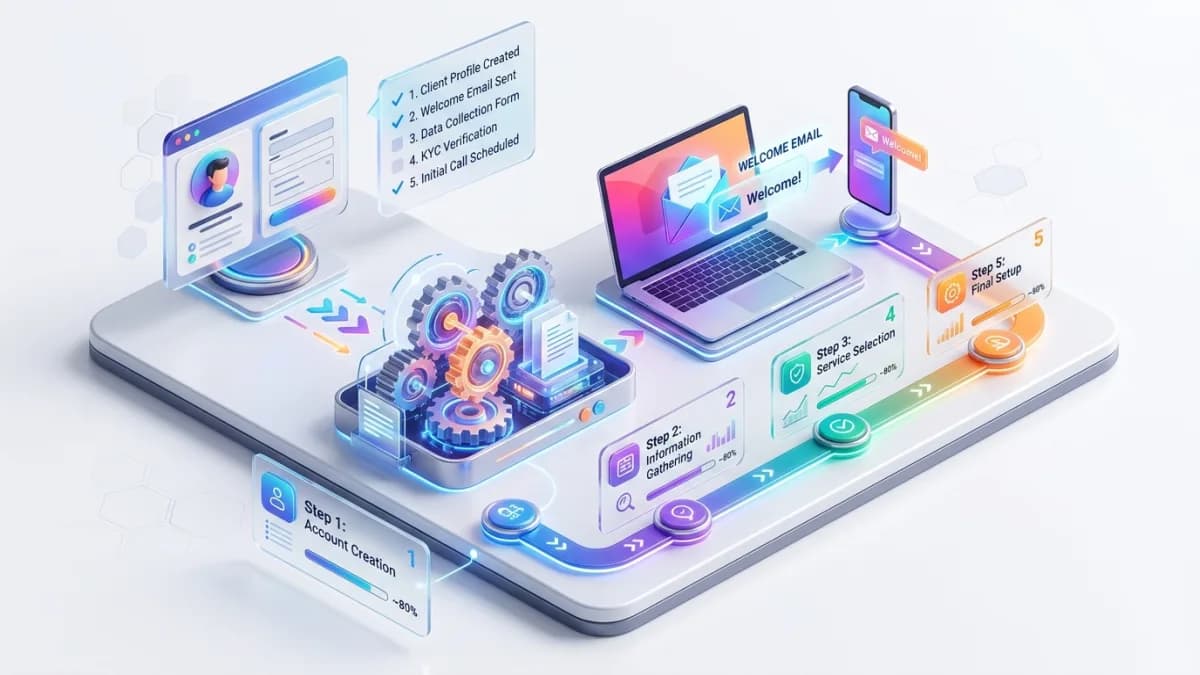
Client onboarding automation connects the moment a prospect becomes a client to the moment your team is ready to deliver. When onboarding works, the client knows what happens next, your team has the right information, payments and contracts are verified, tasks are assigned, documents are collected, and the project starts without a trail of missing details.
When onboarding is weak, everything feels harder than it should.
The client asks the same questions twice. Sales forgets to hand over key context. Delivery starts without signed documents. Finance does not know whether payment arrived. Files are scattered across email threads. Someone creates the wrong project folder. The welcome email promises a timeline the team cannot meet. Automation then makes the mess faster.
This guide gives you a practical workflow, tool map and checklist for client onboarding automation. It is written for service businesses, agencies, consultants, accountants, coaches, education providers, professional firms and local companies that need a reliable process between sales and delivery.
Use this with the Small-Business Automation Guide, Business Automation Guide, Agency Client Onboarding Case Study, Client Portal Development Guide, and Business Automation & Integrations.
Key Takeaways
- Client onboarding automation should begin only after the onboarding process is mapped.
- The best workflow connects CRM, proposal/contract, payment, intake form, document collection, project setup and client communication.
- Automation should verify required conditions before triggering welcome emails or delivery tasks.
- Every onboarding workflow needs owners, statuses, required fields, exceptions, approvals and audit history.
- Forms and documents should collect only useful information and protect sensitive data.
- A client portal is useful when clients need status, uploads, approvals or ongoing access.
- Automation success should be measured by onboarding time, missing-information rate, client response time, payment readiness and delivery handoff quality.
What Client Onboarding Automation Means
Client onboarding automation uses software to coordinate the repeatable steps that turn a new client into a delivery-ready account.
It may include:
- converting a won deal into a client record
- sending a welcome email
- requesting an intake form
- collecting documents
- verifying contract status
- checking deposit or payment status
- creating project tasks
- inviting the client to a portal
- scheduling a kickoff call
- assigning internal owners
- notifying finance, sales and delivery
- tracking onboarding progress
The goal is not to remove human warmth. The goal is to remove avoidable confusion.
Good onboarding automation should make the client feel guided, not processed.
When to Automate Onboarding
Onboarding is worth automating when:
- new clients follow similar steps
- information is repeatedly missing
- handoffs between sales and delivery are weak
- welcome emails are sent manually
- documents are requested through scattered threads
- staff forget to create tasks
- projects start without payment or contract checks
- clients ask what happens next
- onboarding time is slowing growth
- management cannot see onboarding status
Do not automate yet if:
- packages and service scope change every time
- nobody owns onboarding
- required information is unclear
- contracts and pricing are not standardized
- staff disagree on the workflow
- tools are too messy to trust
First stabilize the process. Then automate.
The Lead-to-Client Handoff
The most dangerous onboarding gap is the handoff from sales to delivery.
Sales may know:
- client goals
- promised scope
- budget
- timeline
- objections
- decision makers
- communication style
- risks
- custom terms
Delivery needs that information, but it often stays in calls, chat messages or a salesperson's memory.
Automation should create a structured handoff record.
Handoff checklist
Required fields may include:
- client name
- company name
- primary contact
- billing contact
- service/package
- signed proposal or contract
- agreed scope
- start date
- expected delivery date
- payment status
- special requirements
- files already received
- promised outcomes
- internal notes
- risk flags
- assigned account owner
- assigned delivery owner
If the handoff record is incomplete, automation should pause and assign a correction task instead of pretending everything is ready.
Onboarding Workflow Map
A practical onboarding workflow can follow this sequence:
| Stage | Automation action | Human control |
|---|---|---|
| Deal won | Update CRM stage and create client record | Sales confirms scope |
| Contract | Send or verify contract status | Manager approves custom terms |
| Payment | Check deposit or invoice status | Finance handles exceptions |
| Intake | Send onboarding form and document requests | Client success reviews answers |
| Setup | Create project, folders, tasks and portal access | Delivery lead confirms readiness |
| Kickoff | Send scheduling link and agenda | Account owner attends |
| Handoff | Notify team with structured summary | Delivery accepts project |
| Review | Track missing items and blockers | Owner resolves blockers |
The key is not the exact software. The key is stage control.
Each stage should have:
- entry condition
- exit condition
- owner
- status
- exception path
- client communication
- internal notification
Required Data and Forms
Forms are useful when they collect information your team actually uses.
Good intake form fields:
- business details
- main contact
- billing details
- project goals
- target audience
- current tools
- existing website/accounts
- brand assets
- required access
- deadlines
- approval contacts
- file uploads
- constraints
Bad intake forms ask everything imaginable, then nobody reads the answers.
Form rules
Use:
- required fields only where truly required
- conditional questions
- clear upload instructions
- save-and-return if the form is long
- confirmation message
- automatic internal notification
- data validation
- privacy notice where needed
Do not collect sensitive data casually. If you do not need it, do not ask for it.
Contracts, Payments and Approval Gates
Onboarding automation should not start delivery too early.
Common gates:
- proposal accepted
- contract signed
- deposit paid
- invoice created
- internal approval granted
- required documents received
- access provided
Automation should check the gate before moving to the next stage.
Example:
- If contract signed and deposit paid, send welcome email and create project tasks.
- If contract signed but deposit missing, notify finance and send payment reminder.
- If custom terms exist, route to manager before project setup.
- If required documents are missing, keep onboarding in waiting-on-client status.
This prevents the classic problem: the client receives a confident welcome email while the business is not actually ready.
Project Setup and Internal Tasks
Project setup is a strong automation candidate because it is repetitive.
Automation can create:
- project workspace
- task list
- folder structure
- client portal record
- internal Slack/Teams channel
- kickoff checklist
- invoice tracking item
- delivery timeline
- onboarding status dashboard
Use templates by service type.
Example service packages:
- website design project
- SEO audit
- monthly marketing retainer
- e-commerce setup
- custom development
- consulting engagement
Each template should include only tasks that are truly needed. Too many auto-created tasks become background noise.
Client Communication and Portals
Client communication should be timely, clear and human.
Automated messages may include:
- welcome email
- intake form request
- document request
- payment reminder
- kickoff booking link
- portal invitation
- missing information reminder
- onboarding complete confirmation
Write messages in plain language:
- what happened
- what the client needs to do
- when it is due
- who to contact
- what happens next
A client portal is useful when onboarding includes:
- document uploads
- status tracking
- multiple stakeholders
- approvals
- secure files
- repeated communication
- long onboarding process
Email can notify. The portal can hold the secure details.
Tool Stack Options
There are several ways to build onboarding automation.
Native tool automation
Use automation inside your CRM, project tool, accounting platform or form tool.
Best for:
- simple workflows
- one primary platform
- limited integration needs
- fast setup
Risk:
- workflow may be trapped inside one tool
- complex exceptions become difficult
Integration platform
Use a connector platform to move data between tools.
Best for:
- connecting forms to CRM
- sending notifications
- creating tasks
- syncing simple records
- quick MVP automation
Risk:
- hidden failures
- weak logging
- fragile field mappings
- cost increase as workflows grow
Custom automation
Use custom development when onboarding is strategic, complex or customer-facing.
Best for:
- client portals
- complex permissions
- multi-step approvals
- custom business rules
- high-value workflows
- reporting dashboards
- API integrations
Risk:
- requires better planning and maintenance
The right choice depends on complexity and business value.
Security, Privacy and Access Control
Onboarding often handles sensitive information:
- contracts
- invoices
- account access
- business documents
- identity details
- financial details
- private project files
- login credentials if handled poorly
The FTC advises businesses to control access to sensitive data on a need-to-know basis. That principle is practical for onboarding: sales, finance, delivery and support do not always need the same information.
Security requirements:
- role-based access
- secure file upload
- private storage
- no passwords collected through ordinary forms
- limited internal access
- audit trail for sensitive changes
- secure invitation links
- offboarding access review
- encrypted transmission
- vendor access review
OWASP ASVS can be used as a reference for testing web application controls if onboarding is built into a portal or custom application.
For clients in the EU or UK, GDPR and UK GDPR also expect a clear privacy notice, a data processing agreement with each tool that stores client data, and defined retention periods. Keep onboarding emails transactional; adding a client to a newsletter needs its own consent in the EU and UK, and US commercial email must follow CAN-SPAM.
Testing the Automation
Test onboarding before real clients use it.
Test scenarios:
- standard client
- high-priority client
- missing payment
- unsigned contract
- missing required form field
- file upload failure
- duplicate client
- custom terms requiring approval
- wrong email address
- client with multiple stakeholders
- paused or cancelled onboarding
Test systems:
- CRM
- form tool
- email notifications
- payment/invoice status
- project management tool
- document storage
- client portal
- analytics
For every failure, answer:
- Who is notified?
- What does the client see?
- Can staff correct it?
- Is the error logged?
- Does automation retry safely?
Onboarding KPIs
Measure onboarding so the workflow improves.
Useful KPIs:
- time from deal won to kickoff
- time from contract sent to signed
- time from invoice sent to paid
- intake form completion time
- missing-information rate
- document collection time
- internal handoff completion
- onboarding blocker count
- client response time
- first project milestone readiness
- client satisfaction after kickoff
GA4 lead-generation and sign-up events can help connect website activity to later onboarding outcomes when configured correctly. For service businesses, measurement should not stop at form submission. Track whether leads become qualified, converted and successfully onboarded.
100-Point Onboarding Automation Score
Use this score before launch.
| Area | Points | What 100 percent work looks like |
|---|---|---|
| Workflow map | 15 | Stages, owners, entry/exit conditions and exceptions are documented |
| Handoff data | 10 | Sales-to-delivery information is structured and required |
| Contract/payment gates | 15 | Delivery does not start until required conditions are verified |
| Forms/documents | 10 | Intake and file requests are clear, useful and secure |
| Tool integration | 10 | CRM, project, finance, email and portal connections are mapped |
| Client communication | 10 | Messages are clear, timed and linked to workflow status |
| Access control | 10 | Sensitive onboarding data is limited by role and need |
| Error handling | 10 | Failures, duplicates, missing fields and exceptions have owners |
| Measurement | 5 | KPIs and baseline are defined |
| Training | 5 | Staff know how to use, pause and correct the workflow |
Score interpretation
- 90 to 100: Ready for controlled launch.
- 75 to 89: Good, but fix weak gates or exception paths.
- 50 to 74: Prototype with internal users first.
- Below 50: Do not automate yet; map and stabilize onboarding.
Frequently Asked Questions
What is client onboarding automation?
Client onboarding automation is the use of software to coordinate the repeatable steps after a prospect becomes a client, including contracts, payments, forms, document requests, task creation, portal access and kickoff preparation.
What should be automated first in onboarding?
Start with the handoff from sales to delivery, required intake forms, payment/contract checks and task creation. These reduce missing information and prevent premature project starts.
Do I need a client portal?
You need a portal when clients must upload files, view status, approve work, access secure documents or collaborate with multiple stakeholders. Simple onboarding may only need CRM, forms and email.
Should onboarding emails be automated?
Yes, but only when workflow gates are correct. Do not send a welcome email that implies work has started if contract, payment or required information is missing.
Which tools are best for onboarding automation?
The best tool depends on your workflow. Native CRM/project automations work for simple processes, integration platforms work for multi-tool handoffs, and custom development fits complex or customer-facing onboarding.
How do I know onboarding automation is working?
Track onboarding time, missing information, payment readiness, handoff quality, kickoff delays, client response time and staff correction work.
Final Recommendation
Build onboarding automation around readiness, not excitement.
A client should move forward only when the business has the right agreement, payment status, information, documents, owners and delivery plan. Automate reminders, tasks, setup and notifications, but keep approval gates where mistakes would cost trust.
If you want a reliable onboarding workflow with CRM, forms, documents, payments, portals and dashboards connected cleanly, see Business Automation & Integrations.
Related posts

US State Privacy Laws for Small Business Websites: What Applies and What to Do
A practical 2026 guide to US state privacy laws for small business websites: CCPA/CPRA thresholds, the other comprehensive state laws, Texas and Nebraska small-business rules, privacy notices, opt-out of sale and sharing, Global Privacy Control, pixels, forms, vendor contracts and CAN-SPAM.
Read article →

Client Intake Automation for Accounting and Law Firms
How small accounting, bookkeeping and law firms in the US and UK can automate client intake and onboarding: intake forms, conflict checks, engagement letters and e-signature, UK AML identity checks, secure document collection, practice-management integration and data protection.
Read article →

Landing Page vs Website Guide for Small Businesses
A practical guide to choosing between a focused landing page and a full business website.
Read article →
Author
Anushka Dahanayake
Anushka Dahanayake builds SEO-focused websites, e-commerce platforms, dashboards, and automation systems for businesses worldwide.