
Automated Proposal, Contract and Invoice Workflow
A practical guide to automated proposal, contract and invoice workflows for service businesses that need faster sales handoff without losing control.
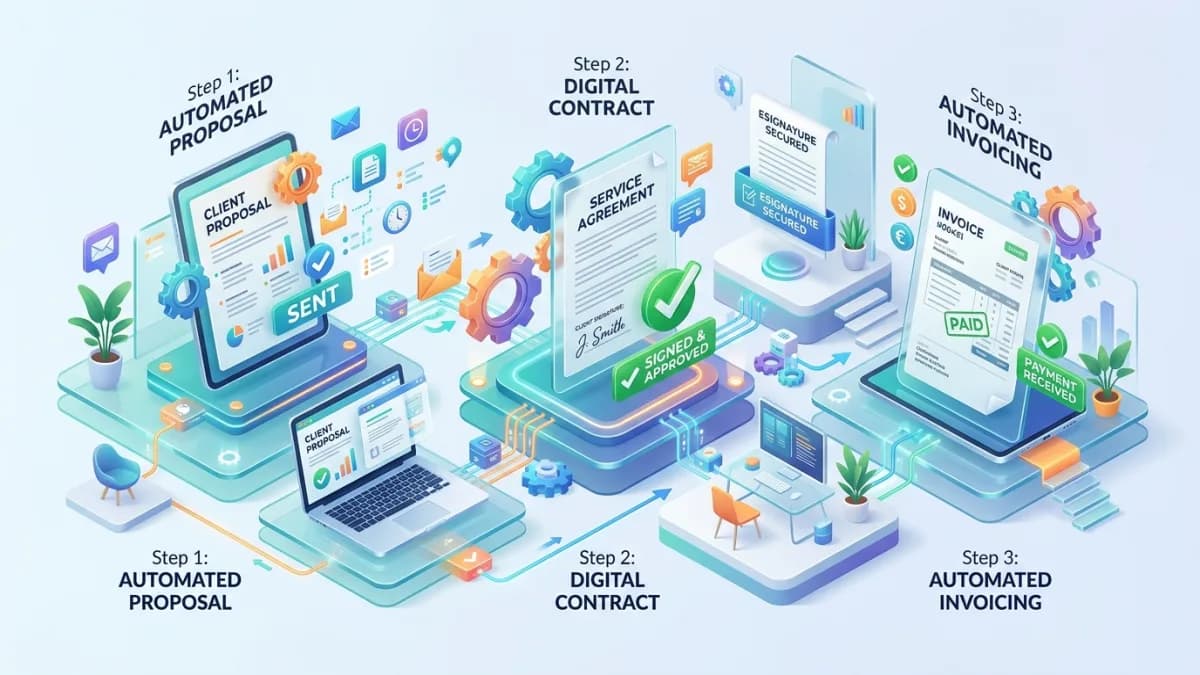
Proposal, contract and invoice workflows sit at the point where sales promises become business commitments. That makes automation valuable, but also risky.
When the workflow works, a qualified opportunity becomes an approved proposal, the proposal becomes an accepted agreement, the agreement becomes an invoice, payment is tracked, onboarding starts at the right time, and everyone can see the status.
When the workflow is weak, the business sends the wrong price, uses an old contract template, invoices too early, starts work before payment, loses approval history, forgets renewal terms or cannot prove what the client accepted.
Automation should make this workflow faster, but not reckless.
This guide explains how to connect proposals, contracts and invoices with CRM data, templates, approval gates, payment checks, reminders, audit trails and reporting. It is written for agencies, consultants, professional services, B2B companies, creative studios, education providers and small businesses selling scoped work or retainers.
This is operational guidance, not legal or accounting advice. For contract terms, tax treatment, invoice rules and electronic signature requirements, use qualified legal and accounting professionals in your jurisdiction.
Use this with the Small-Business Automation Guide, CRM Implementation Guide, Client Onboarding Automation Guide, Payment Gateway Integration Guide, and Business Automation & Integrations.
Key Takeaways
- Proposal, contract and invoice automation should be built around approval gates.
- CRM data can populate documents, but humans should approve pricing, scope and legal commitments.
- Templates need version control so old terms are not reused accidentally.
- Payment status should be verified before onboarding or delivery starts where deposits are required.
- Automation must handle exceptions such as custom terms, discounts, partial payments, tax changes and failed payments.
- Audit history is essential: who approved, what version was sent, when it was accepted, and what invoice was issued.
- Do not put sensitive payment details or contract data into logs or unnecessary notifications.
- Measure proposal speed, acceptance rate, payment delay, error rate and onboarding readiness.
Why This Workflow Matters
This workflow carries business risk because it controls:
- price
- scope
- legal terms
- payment timing
- delivery start
- customer expectations
- revenue recognition signals
- internal handoff
Manual work often fails at handoff points.
Sales may create a proposal from an old template. A manager may approve a discount in chat but not document it. A contract may be signed but finance may not know. Payment may arrive but delivery may not be notified. Delivery may start while the deposit is still pending.
Automation can reduce those gaps when the workflow is designed correctly.
The End-to-End Workflow
A practical workflow:
| Stage | Automation | Control |
|---|---|---|
| Qualified opportunity | CRM deal is marked ready for proposal | Sales confirms requirements |
| Proposal draft | Approved template is populated | Owner reviews scope and price |
| Proposal approval | Manager reviews if rules require | Approval is logged |
| Proposal sent | Client receives proposal | Version is locked |
| Accepted proposal | Status updates in CRM | Acceptance evidence captured |
| Contract draft | Contract template is populated | Legal/custom terms reviewed |
| Signature | Client signs or approves | Signed version stored |
| Invoice | Invoice created from approved data | Finance verifies tax/payment rules |
| Payment | Payment link/status tracked | Failed/partial payment handled |
| Onboarding | Workflow starts when gates are met | Delivery confirms readiness |
The key is controlled progression. One stage should not trigger the next until required conditions are true.
Data Requirements
Automation needs trusted data.
Required fields may include:
- client/company name
- billing contact
- decision maker
- service/package
- proposal owner
- scope summary
- price
- currency
- tax/VAT rules where applicable
- discount
- payment terms
- deposit requirement
- contract template
- proposal template
- start date
- renewal date
- custom terms flag
- approval owner
Bad data creates bad documents.
Before automation, decide which system owns each field:
- CRM owns deal and client details
- proposal tool owns proposal version and acceptance
- contract/signature tool owns signed agreement
- accounting system owns invoice and payment status
- project tool owns delivery tasks
Proposal Automation
Proposal automation can create a first draft from CRM data and approved templates.
Useful features:
- template selection by service
- client data merge
- pricing table
- scope sections
- optional add-ons
- timeline
- exclusions
- next steps
- internal review
- client view tracking
- acceptance status
Control points:
- proposal cannot be sent without owner review
- discount above threshold requires approval
- custom scope requires manager approval
- expired pricing cannot be used
- template version is stored
- accepted proposal is locked
Automation should reduce formatting and copying, not remove commercial judgment.
Contract Automation
Contract automation should be conservative.
Useful features:
- populate client details
- select approved contract template
- attach proposal reference
- route custom terms for review
- request signature
- store signed copy
- update CRM status
- trigger invoice workflow
Do not let automation silently change legal terms.
Rules:
- use approved templates
- mark custom terms clearly
- require review for non-standard clauses
- store final signed version
- keep acceptance timestamp
- connect contract to proposal/deal
- restrict who can edit templates
Electronic signatures and contract enforceability depend on jurisdiction, document type and process. In the US, the federal ESIGN Act and state UETA laws generally give electronic signatures legal effect; in the EU, the eIDAS Regulation does the same and defines advanced and qualified signature levels, and the UK has equivalent rules. Each has exceptions, so get legal advice for important agreements.
Invoice and Payment Automation
Invoice automation connects agreement to revenue process.
Useful features:
- create invoice after contract acceptance
- create deposit invoice
- send payment link
- track paid/partial/failed status
- send payment reminders
- notify finance
- trigger onboarding after payment gate
- reconcile payment gateway status
- store transaction reference
GA4 ecommerce measurement documents purchase and refund events for tracking transaction behavior. For service businesses, analytics is only one part of the picture; the accounting/payment system remains the source of truth for payment status.
Payment rules:
- invoice amount must match approved proposal
- tax rules must be reviewed, including whether a country requires structured e-invoices (several EU member states, such as Germany and Belgium, are phasing in mandatory structured e-invoicing for domestic B2B sales)
- payment status must come from trusted system
- failed payments should not trigger onboarding
- partial payments need clear handling
- refunds and cancellations need audit trail
Approval Gates
Approval gates prevent expensive mistakes.
Common gates:
- proposal over value threshold
- discount above threshold
- custom scope
- custom terms
- non-standard payment schedule
- rush timeline
- high-risk client requirements
- tax or currency exception
- legal review required
Approval record should capture:
- approver
- date/time
- item approved
- version
- comments
- conditions
Avoid vague approval such as looks good. The approval should refer to the actual version and terms.
Templates and Version Control
Templates are the heart of this workflow.
Control:
- proposal templates
- contract templates
- invoice item templates
- email templates
- scope libraries
- pricing tables
Each template should have:
- version number
- owner
- last reviewed date
- approved use case
- change history
- retired status if outdated
Do not let old templates live forever in someone's folder. That is how ancient terms crawl back into modern deals like tiny legal ghosts.
Integrations and Systems of Record
Common integrations:
- CRM
- proposal software
- e-signature tool
- accounting platform
- payment gateway
- project management system
- client portal
- email/notification service
- dashboard/reporting system
Define source of truth:
| Data | Source of truth |
|---|---|
| Client relationship | CRM |
| Accepted proposal | Proposal tool or CRM attachment |
| Signed agreement | E-signature/contract repository |
| Invoice | Accounting system |
| Payment status | Payment/accounting system |
| Delivery readiness | Project/onboarding system |
If systems disagree, the workflow should not guess. It should flag an exception.
Security, Privacy and Audit Trails
This workflow handles sensitive business data.
Protect:
- client details
- pricing
- discounts
- contracts
- invoices
- payment references
- tax details
- internal notes
The FTC recommends thoughtful data collection and reasonable access controls for sensitive information. OWASP ASVS data protection guidance also emphasizes identifying sensitive data and documenting protection requirements. Apply both ideas here: collect what you need, classify sensitive information, and restrict access.
Security requirements:
- role-based access
- MFA for finance/admin tools where available
- restricted template editing
- secure document storage
- private links where possible
- no payment details in logs
- no credentials in documents
- audit trail for approvals
- access review for vendors
- retention rules
Logs should record important workflow events without exposing sensitive payment or contract details unnecessarily.
Testing the Workflow
Test scenarios:
- standard proposal accepted
- discount approval required
- custom terms required
- proposal rejected
- contract unsigned
- invoice failed to create
- payment failed
- partial payment
- duplicate client
- wrong billing contact
- onboarding blocked by unpaid deposit
- template retired
- integration unavailable
Confirm:
- correct document generated
- correct version stored
- approval required when expected
- CRM status updates
- invoice amount matches proposal
- payment status is accurate
- onboarding triggers only after gates
- errors notify owner
- audit trail is readable
KPIs and Reporting
Measure:
- proposal creation time
- proposal approval time
- proposal acceptance rate
- contract completion time
- invoice creation time
- days to payment
- failed payment rate
- discount approval rate
- document error rate
- onboarding delay from payment
- revenue by service/package
Reports should help improve the process:
- Are proposals waiting too long for approval?
- Are custom terms slowing deals?
- Are clients delaying signature?
- Are invoices mismatching proposals?
- Are payment reminders working?
100-Point Workflow Readiness Score
Use this before automation.
| Area | Points | What 100 percent work looks like |
|---|---|---|
| Workflow map | 10 | Proposal, contract, invoice and onboarding stages are defined |
| Data quality | 10 | Required fields and systems of record are documented |
| Proposal controls | 10 | Scope, pricing, discounts and versions are reviewed |
| Contract controls | 15 | Templates, custom terms and signature evidence are governed |
| Invoice controls | 10 | Invoice creation, payment status and reconciliation are reliable |
| Approval gates | 15 | High-risk changes require logged approval |
| Integrations | 10 | CRM, document, accounting and project systems are mapped |
| Security/privacy | 10 | Sensitive data and access are controlled |
| Testing | 5 | Normal and exception scenarios are tested |
| Reporting | 5 | KPIs identify delay, error and payment issues |
Score interpretation
- 90 to 100: Ready for controlled automation.
- 75 to 89: Good, but strengthen approvals or integration checks.
- 50 to 74: Pilot internally first.
- Below 50: Do not automate yet; document and stabilize the workflow.
Frequently Asked Questions
What is proposal contract invoice automation?
It is the use of software to generate, approve, send, track and connect proposals, contracts, invoices and payment status across CRM, document, accounting and onboarding systems.
Should proposals be fully automated?
Drafting can be automated, but scope, pricing and client-facing commitments should be reviewed by a responsible human before sending.
Can automation send contracts automatically?
It can, but only when approved templates, correct client data and required review gates are in place. Custom terms should receive human review.
When should onboarding start?
Onboarding should start only when required gates are satisfied, such as accepted proposal, signed contract, deposit/payment status and internal approval.
What is the biggest risk?
The biggest risk is automating incorrect commitments: wrong price, wrong scope, old terms, missing approval or invoice mismatch.
Do I need legal advice?
For contract language, electronic signatures, tax rules, invoice requirements and jurisdiction-specific obligations, yes. Automation should follow approved professional guidance.
Final Recommendation
Automate the workflow, not the responsibility.
Use CRM data to draft documents, templates to standardize language, approvals to control risk, accounting systems to verify invoices and payments, and audit trails to preserve evidence. The result should be faster sales operations with fewer mistakes, not a machine that sends commitments nobody reviewed.
If you want proposal, contract, invoice and onboarding workflows connected safely across your business systems, see Business Automation & Integrations.
Related posts

Business Email Compromise and Invoice Fraud: How Small Businesses Stop It
A defensive guide to business email compromise and invoice fraud for small businesses: how the scams work at a high level, the red flags, the payment and email controls that stop them, and what to do in the first hours after a fraudulent transfer in the US, UK and EU.
Read article →

Strong Customer Authentication and 3-D Secure 2 for EU and UK Checkouts
A practical guide to Strong Customer Authentication for online stores: when it applies to EEA and UK cards, the main exemptions, how 3-D Secure 2 works, how Stripe, PayPal, Shopify and WooCommerce handle it, and how to fix failed subscription payments.
Read article →

Checkout Trust Signals Guide for Online Stores
A practical guide to adding trust signals that help shoppers feel safer at checkout.
Read article →
Author
Anushka Dahanayake
Anushka Dahanayake builds SEO-focused websites, e-commerce platforms, dashboards, and automation systems for businesses worldwide.